TikTok Unblocked Website: Navigating Access in Restricted Environments
February 23, 2026 • César Daniel Barreto

TikTok is a powerful platform for creativity and social interaction, but accessing it can be difficult due to network restrictions in schools, workplaces, and certain regions. This article will discuss various methods and tools for bypassing these restrictions, enabling seamless access to TikTok.
Quick Fix Summary Table
| Issue | Solution | Tools/Methods |
|---|---|---|
| Network Restrictions | Use VPN or Proxy | SafeShell VPN |
| App Blocks on Devices | Browser Access | Chrome Extensions |
| Geographical Bans | Connect to Different Server | NordVPN, ExpressVPN |
| Ad Interruptions | Ad Blockers | uBlock Origin |
Why TikTok Is Blocked on School or Work PCs
TikTok may be restricted on PC networks for several reasons:
1. Firewall Blocking
Organizations often use firewalls to block specific domains or IP ranges associated with social media platforms.
2. DNS Filtering
Network administrators can prevent TikTok’s domain from resolving through DNS-level restrictions.
3. Content Filtering Software
Schools and workplaces use filtering systems that categorize TikTok as “entertainment” or “social media” and block it automatically.
4. Managed Device Restrictions
On school-issued laptops or Chromebooks, administrative enrollment may prevent access regardless of the network used.
Understanding which method is being used helps determine whether a “TikTok unblocked website” solution will work.
How to Access TikTok on PC When It’s Restricted
Below are the most common and realistic solutions for accessing TikTok on a restricted PC.
Method 1: Use TikTok’s Official Web Version
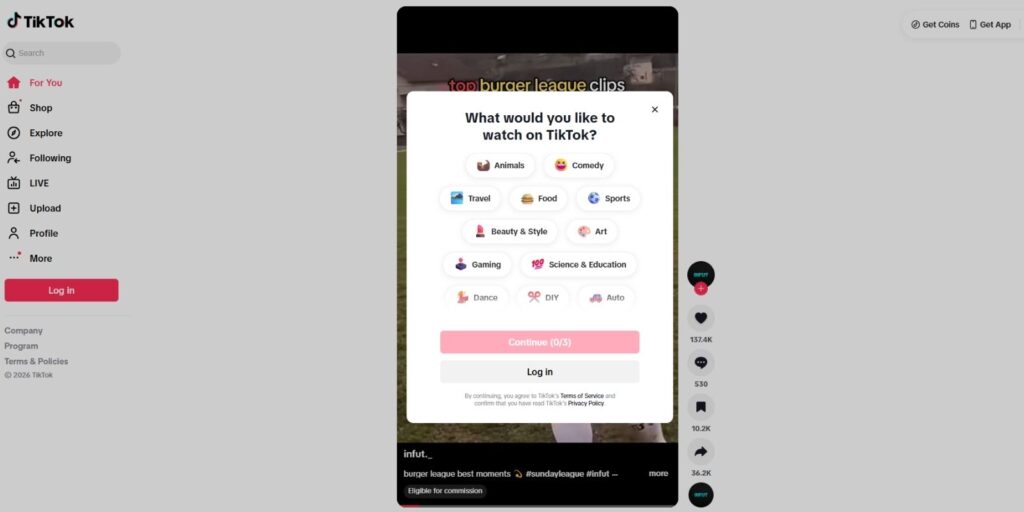
Before trying anything else:
- Open Chrome, Edge, Firefox, or Safari.
- Enter TikTok web.
- Check if the site loads normally.
In some environments, only the mobile app is blocked while the website remains accessible.
If you see:
- “Access Denied”
- DNS error
- Network policy message
Then the domain is likely blocked at the network level.
Method 2: Use a VPN on Your PC
A Virtual Private Network (VPN) encrypts your traffic and routes it through an external server. If TikTok is blocked by firewall or DNS filtering, a VPN may restore access.
Several reputable paid VPN providers are widely used for accessing restricted platforms, including:
- NordVPN
- Surfshark
- Proton VPN
- SafeShell VPN
SafeShell VPN claims a 98% TikTok unblocking success rate in its own comparison tests, though this figure comes from the provider’s materials rather than independent third-party studies. The company also states setup can take less than two minutes. In practice, many high-quality VPNs can restore TikTok access quickly on unrestricted personal PCs.
Basic setup steps on Windows or macOS:
- Download the VPN client from the provider’s official site.
- Install the software.
- Connect to a server in a region where TikTok is accessible.
- Open TikTok in your browser.
⚠ Important: Installing VPN software on school or work PCs may violate acceptable-use policies. Always review institutional rules first.
Method 3: Browser-Based VPN Extensions
If installing software is not allowed, some VPN providers offer browser extensions for Chrome or Edge.
These can:
- Mask browser traffic
- Change visible IP location
- Potentially bypass domain-level blocks
However:
- They may not work against strict firewall rules
- Performance may be slower
- Security protections are typically weaker than full VPN apps
Method 4: Web Proxies (Use With Caution)
Some websites advertise themselves as “TikTok unblocked sites” and load TikTok through a proxy server.
While these sometimes work, they carry significant risks:
- Data logging
- Malware injection
- Fake login portals
- Broken video playback
Never enter TikTok credentials on an unfamiliar proxy website. If you must use a proxy, avoid logging into your account.
How to Unblock TikTok on a School PC or Chromebook
School Chromebooks and managed Windows laptops are often enrolled under an IT department’s administrative control.
These devices typically have:
- Disabled extension installation
- Blocked VPN protocols
- Locked DNS settings
- Disabled developer mode
If restrictions are enforced at the device configuration level, bypassing them may not be technically possible without administrative credentials.
Attempting to circumvent these protections can lead to disciplinary action. The safer option is usually accessing TikTok on a personal PC outside the restricted network.
Risks of Using Free TikTok Unblocked Sites
Many users searching for a TikTok unblocked website encounter free “mirror” platforms promising instant access.
Common risks include:
- Phishing pages asking for TikTok login details
- Ad injection and tracking
- Malware downloads
- Poor performance and broken features
Free web proxies often log browsing activity or inject advertisements to monetize traffic. For privacy and security reasons, using TikTok’s official site with a reputable VPN is generally safer than relying on unknown mirror sites.
Is It Legal to Unblock TikTok on PC?
This depends on context. On a personal device and personal network, using a VPN is typically legal in many countries (though regulations vary by region). On school or workplace devices, bypassing restrictions may violate acceptable-use agreements.
Before attempting to unblock TikTok, review:
- Your school or employer’s IT policies
- Local regulations regarding VPN use
- Any signed device usage agreements
Understanding the rules helps avoid unintended consequences.
FAQs
Why does TikTok work on my phone but not on my PC?
In many cases, school or workplace networks block TikTok only on managed desktop devices. Your phone may work because you’re using mobile data instead of Wi-Fi, the device isn’t managed by an administrator, and the app uses different routing methods than the browser.
If TikTok works on your phone but not your PC, the restriction is likely network-level or device-level on the computer.
Can I access TikTok on PC without installing anything?
Yes, if TikTok is not fully blocked at the domain level. Try this first open your browser. Go to Tiktok Webpage. Check if videos load normally. If the website loads, you don’t need a VPN or additional tools. If it shows an error or block message, the network likely restricts the domain itself.
What is the safest way to unblock TikTok on a personal PC?
On a personal computer (not managed by school or work), the safest approach is using TikTok’s official website. If blocked, use a reputable paid VPN. Avoid free mirror or proxy websites. Reputable VPN providers (such as NordVPN, Surfshark, Proton VPN, or SafeShell) encrypt traffic and reduce the risk of malware or phishing that often comes with free proxy sites.
Do free “TikTok unblocked websites” actually work?
Some do, temporarily. However, many inject ads, log browsing activity, break video playback, request login credentials. You should never enter your TikTok password on an unofficial mirror site. Free proxies often come with privacy and security risks.
Final Thoughts
A “TikTok unblocked website” is not a separate official platform but a phrase people use when trying to access TikTok on a restricted PC. In many cases, the official web version is enough. When stronger network controls are in place, VPNs may restore access, provided usage complies with local rules and device policies.
The safest strategy is always to prioritize security, avoid suspicious mirror sites, and understand the technical and policy limits of the network you’re using.

César Daniel Barreto
César Daniel Barreto is an esteemed cybersecurity writer and expert, known for his in-depth knowledge and ability to simplify complex cyber security topics. With extensive experience in network security and data protection, he regularly contributes insightful articles and analysis on the latest cybersecurity trends, educating both professionals and the public.
 English
  German
  Danish
  Italian
  Swedish
  Romanian
  Thai
Thai  Vietnamese
  Japanese
  Dutch
Dutch  Korean
  Arabic
  Hungarian