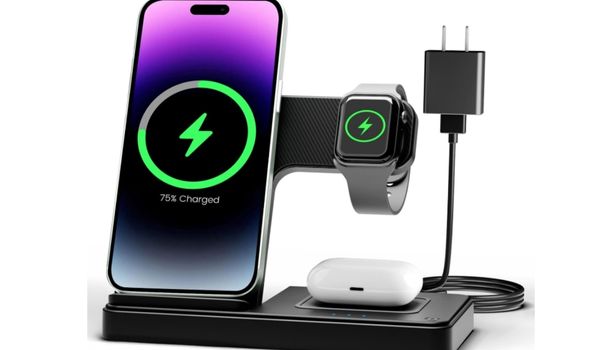
In an age where convenience and efficiency reign supreme, the way we power our devices is evolving. The
wireless charger has transformed the charging landscape, offering a sleek and hassle-free alternative to
traditional cables. Imagine simply placing your phone down and watching it power up instantly—no fumbling with
cords, no wear and tear on charging ports, just seamless power delivery.
These innovative chargers are not just a luxury; they’re becoming essential for anyone seeking to streamline
their tech experience. Whether you own an iPhone, Samsung device, or any other smartphone, understanding how to
choose the right wireless charger can make a significant difference in your daily routine. This comprehensive
guide will walk you through everything you need to know about selecting the perfect wireless charger for your
needs.
Table of Contents
- Understanding Wireless Charging Technology
- Key Factors to Consider When Choosing a Wireless Charger
- Charging Speed and Power: What the Numbers Mean
- Charging Pad vs Charging Stand: Which Style Is Right for
You? - MagSafe Compatibility and Qi Certified Standards
- Device Compatibility: iPhone, Samsung, and Android
- Case Compatibility and Charging Through Cases
- Cooling Mechanisms and LED Indicators
- Power Adapters and Charging Efficiency
- Best Wireless Chargers for Different Use Cases
- Tips for Maintaining Your Wireless Charger
- Frequently Asked Questions
Understanding Wireless Charging Technology
Before diving into how to pick a good wireless charger, it’s essential to understand the charging technology
behind these devices. Wireless charging uses electromagnetic induction to transfer energy between two coils—one
embedded in the charger and another in your device. When you place your smartphone on the charging surface, these
coils align, creating a magnetic field that transfers power to your device’s battery.
The most common standard for wireless charging is Qi (pronounced “chee”), developed by the Wireless Power
Consortium (WPC). A Qi certified charger ensures compatibility with a wide range of devices and guarantees safety
standards are met. This certification is crucial because it means the charger has undergone rigorous testing for
charging reliability and performance.
Modern charging technology has evolved significantly from its early days. What started as a slow, somewhat
inefficient method of powering devices has become a fast, reliable alternative to wired charging. Today’s wireless
chargers offer impressive charging speed that rivals traditional cable charging in many scenarios.
Pro Tip: The latest advancement in charging technology is Qi2, which incorporates magnetic
alignment similar to Apple’s MagSafe. This ensures optimal positioning between the charging coils, maximizing
charging efficiency and reducing energy waste.
Key Factors to Consider When Choosing a Wireless Charger
Selecting the best wireless charger involves evaluating several important factors. Here’s a comprehensive
breakdown of what to look for:
Build Quality and Design
The construction of your wireless charger matters more than you might think. A well-built charger will last
longer and provide more consistent performance. Look for chargers with premium materials, non-slip charging
surfaces, and sturdy construction. The charging footprint—the physical space the charger occupies—should also
match your available desk or nightstand space.
Safety Features
Quality wireless chargers include multiple safety protections, including overcharge protection, temperature
control, and foreign object detection. These features prevent damage to both the charger and your devices while
ensuring charging reliability over time.
Portability
Consider where and how you’ll use your wireless charger. If you travel frequently, a compact charging pad might
be ideal. For home or office use, a larger charging stand with multiple device support could be more
practical.
Price vs. Value
While it’s tempting to opt for the cheapest option, investing in a quality wireless charger from a reputable
brand often pays off in longevity, safety, and performance. Compare features across price points to find the best
value for your needs.
Charging Speed and Power: What the Numbers Mean
One of the most critical factors when choosing a wireless charger is understanding charging speed and charging
power. These specifications directly impact how quickly your devices will power up.
Understanding Wattage
Wireless chargers are rated by their power output in watts (W). Here’s what different wattage levels mean for
your charging experience:
| Power Output | Charging Speed | Best For |
|---|---|---|
| 5W | Standard/Slow | Basic overnight charging, older devices |
| 7.5W | Moderate | iPhone standard wireless charging |
| 10W | Fast | Samsung and most Android devices |
| 15W | Very Fast | Latest flagship phones, Qi2 devices |
| 20W-30W | Ultra Fast | Premium chargers with optimized delivery |
Which Is Better: 20W or 30W Charger?
Based on comprehensive testing, a 30W wall charger (like the USB-C PD 3.0 fast charger) emerged as the fastest
and most efficient option. However, the 20W version maintained the most consistent temperature and charging
efficiency throughout the charging cycle. For most users, a 20W charger provides an excellent balance between
speed and heat management.
Is 10W or 15W Better for Wireless Charging?
The answer depends on your device. A 15W charger offers significantly faster charging speed for compatible
devices, cutting charge times by up to 50% compared to 10W chargers. However, if your phone only supports 10W
wireless charging (common in many mid-range Android phones), a 15W charger won’t provide any additional
benefit—your device will simply draw the maximum charging power it can handle.
Is a 25W or 45W Charger Better?
For the wall adapter powering your wireless charger, higher wattage provides more headroom but doesn’t
necessarily mean faster wireless charging. Most wireless chargers max out at 15W output regardless of the input
power. A 25W adapter is typically sufficient for most single-device wireless chargers, while a 45W adapter might
be necessary for multi-device charging stations that power multiple devices simultaneously.
Charging Speed Comparison
Here’s a practical charging speed comparison for a typical smartphone battery:
| Charger Type | Time to 50% | Time to Full |
|---|---|---|
| 5W Wireless | 90+ minutes | 4+ hours |
| 10W Wireless | 60 minutes | 2.5-3 hours |
| 15W Wireless | 45 minutes | 2-2.5 hours |
| Wired USB-C (20W) | 30 minutes | 1.5-2 hours |
While wired charging remains faster, the convenience of wireless charging often outweighs the speed difference
for daily use.
Charging Pad vs Charging Stand: Which Style Is Right for You?
When shopping for a wireless charger, you’ll encounter two primary form factors: the charging pad and the
charging stand. Each has distinct advantages depending on your usage patterns.
Charging Pad Style
A charging pad is a flat, often circular or rectangular surface where you lay your device horizontally. This
style offers several benefits:
Advantages:
- Lower profile and minimal charging footprint
- Often more affordable
- Easy to slide your phone on and off
- Works well on nightstands for overnight charging
- Better for charging multiple small devices like earbuds
Considerations:
- Screen not easily visible while charging
- Must pick up the phone to check notifications
- Precise placement sometimes required for optimal charging depth
Charging Stand Style
A charging stand holds your device upright at various charging angles, keeping the screen visible and
accessible.
Advantages:
- Screen remains visible for notifications and calls
- Ideal for video calls and watching content while charging
- Face ID/facial recognition works while charging (iPhone)
- Multiple charging angles available on adjustable models
- Professional look for office environments
Considerations:
- Larger footprint than flat pads
- Generally more expensive
- May not accommodate all phone sizes in cases
| Feature | Charging Pad | Charging Stand |
|---|---|---|
| Visibility | Low | High |
| Footprint | Smaller | Larger |
| Price Range | $15-$50 | $25-$80 |
| Use While Charging | Limited | Excellent |
| Overnight Charging | Excellent | Good |
| Multiple Devices | Often supported | Sometimes supported |
| Travel-Friendly | Yes | Sometimes |
MagSafe Compatibility and Qi Certified Standards
Understanding the difference between MagSafe and standard Qi charging is crucial, especially for iPhone
users.
What Is MagSafe?
MagSafe is Apple’s proprietary magnetic wireless charging technology, introduced with the iPhone 12. It uses a
ring of magnets to perfectly align your iPhone with the charging coil, ensuring optimal charging efficiency every
time. MagSafe compatibility offers several unique benefits:
- Perfect alignment every time
- Faster charging speeds (up to 15W for iPhone)
- Support for MagSafe accessories (wallets, mounts, etc.)
- Secure attachment that won’t slip
What Does Qi Certified Mean?
Qi certified means a charger has been tested and approved by the Wireless Power Consortium. This certification
ensures:
- Compatibility with all Qi-enabled devices
- Safety standards compliance
- Consistent charging performance
- Interoperability across brands
| Feature | MagSafe | Standard Qi |
|---|---|---|
| Alignment | Magnetic (Perfect) | Manual |
| Max iPhone Speed | 15W | 7.5W |
| Android Compatibility | Limited | Universal |
| Price | Higher | Lower |
| Accessory Ecosystem | Extensive | Limited |
| Best For | iPhone users | Universal use |
Important: For maximum charging reliability and safety, always choose a Qi certified wireless
charger. Non-certified chargers may be cheaper but can pose risks to your device and potentially void
warranties.
| Aspect | Qi Certified | Non-Certified |
|---|---|---|
| Safety Testing | Comprehensive | Unknown |
| Compatibility | Guaranteed | Variable |
| Performance | Consistent | Unpredictable |
| Warranty Support | Better | Limited |
| Price | Moderate-High | Low |
| Risk Level | Low | Higher |
Device Compatibility: iPhone, Samsung, and Android
Not all wireless chargers work equally well with all devices. Understanding device compatibility ensures you
get the best performance from your purchase.
iPhone Wireless Charging
Apple introduced wireless charging with the iPhone 8 and has supported it in every model since. Here’s what
iPhone users need to know:
- iPhone 8 through iPhone 11: Support standard Qi charging up to 7.5W
- iPhone 12 and later: Support MagSafe at 15W and standard Qi at 7.5W
- iPhone 15 and later: Support Qi2 standard for improved third-party fast charging
For iPhone users, a MagSafe or Qi2-compatible wireless charger offers the best experience with maximum charging
speed. Standard Qi chargers work but charge at slower speeds.
Samsung Wireless Charging
Samsung has been a pioneer in wireless charging, with support dating back to the Galaxy S6. Current Samsung
devices offer excellent wireless charging capabilities:
- Samsung Galaxy S and Note series: Support up to 15W fast wireless charging
- Samsung Galaxy Z Fold/Flip: Support wireless charging with specific charger requirements
- Samsung watches and buds: Compatible with most Qi chargers
Samsung’s proprietary fast wireless charging requires a compatible Samsung wireless charger or a high-quality
third-party option that supports Samsung’s charging profiles.
Android Device Compatibility
The broader Android ecosystem offers varying levels of wireless charging support:
- Flagship Android phones: Most support 10W-15W wireless charging
- Mid-range Android phones: Often support 5W-10W wireless charging
- Budget Android phones: Wireless charging less common
When choosing a wireless charger for Android devices, verify your specific phone’s maximum wireless charging
speed to ensure you’re not overpaying for capabilities you can’t use.
Case Compatibility and Charging Through Cases
One common concern with wireless charging is whether it works through phone cases. The good news is that most
wireless chargers can handle charging through cases—with some limitations.
Understanding Case Thickness
Case thickness directly impacts wireless charging performance. Here’s what you need to know:
| Case Thickness | Charging Performance | Compatibility |
|---|---|---|
| Under 3mm | Excellent | All chargers |
| 3-5mm | Good | Most chargers |
| 5-7mm | Moderate | High-power chargers |
| Over 7mm | Poor/None | Few chargers |
Factors Affecting Case Compatibility
Material:
- Silicone and plastic cases: Generally compatible
- Leather cases: Usually compatible
- Metal cases or metal plates: NOT compatible (blocks charging)
- Carbon fiber cases: May interfere with charging
Features:
- Built-in magnets: May help (MagSafe) or hinder alignment
- Card holders: Can interfere, especially with metal cards
- Kickstands: Metal kickstands may block charging
- Battery cases: Often have their own wireless charging coils
Charging Depth Explained
Charging depth refers to the maximum distance between the charging coil in your charger and the receiving coil
in your device that still allows effective power transfer. Higher-quality chargers typically offer greater
charging depth, making them more forgiving with thicker cases.
Most standard wireless chargers have a charging depth of 4-8mm. Premium chargers may offer up to 10mm, which
accommodates nearly any standard case.
Tips for Charging Through Cases:
- Remove any metal cards or objects from between your phone and case
- Ensure proper alignment, especially with non-magnetic chargers
- If charging seems slow, try removing the case temporarily
- Look for chargers specifically designed for “through-case” charging
- Consider a MagSafe-compatible case for guaranteed alignment
Cooling Mechanisms and LED Indicators
Heat management and status indication are often overlooked features that significantly impact the user
experience.
Why Cooling Matters
Wireless charging generates heat as a byproduct of electromagnetic energy transfer. Excessive heat can:
- Slow down charging speeds (devices throttle when hot)
- Reduce battery longevity over time
- Potentially damage device components
- Create safety hazards in extreme cases
Cooling Fan Technology
Premium wireless chargers often include a built-in cooling fan to manage heat effectively. Benefits
include:
- Maintains optimal charging speed throughout the charging cycle
- Protects both the charger and your device
- Enables consistent fast charging without thermal throttling
- Extends the lifespan of both charger and device battery
When evaluating chargers with a cooling fan, consider:
- Noise level (important for bedroom use)
- Fan activation triggers (some run constantly, others only when needed)
- Airflow design (bottom-mounted vs. side-vented)
Passive Cooling Alternatives
Some chargers use passive cooling mechanisms instead of fans:
- Aluminum or metal housings that dissipate heat
- Heat sink designs integrated into the charger
- Ventilation holes for natural airflow
- Graphene or other advanced heat-spreading materials
LED Indicators: Features to Look For
LED indicators provide valuable feedback about your charger’s status. Quality chargers include indicators
for:
| Indicator | Meaning | Why It Matters |
|---|---|---|
| Solid light | Charging in progress | Confirms proper placement |
| Blinking light | Error or misalignment | Alerts you to adjust device |
| Color change | Charge complete | Prevents overcharging concerns |
| No light | Standby mode | Confirms charger is ready |
| Red/orange | Foreign object detected | Safety warning |
Consider whether you prefer bright LED indicators (visible in daylight) or subtle indicators (better for
bedside use). Some chargers offer adjustable brightness or the option to disable lights entirely for
sleep-friendly charging.
Power Adapters and Charging Efficiency
The power adapter you use with your wireless charger is just as important as the charger itself. Many wireless
chargers ship without an adapter, leaving users to supply their own.
Choosing the Right Power Adapter
| Charger Output | Recommended Adapter | Minimum Adapter |
|---|---|---|
| 5W | 10W (5V/2A) | 5W (5V/1A) |
| 10W | 18W (9V/2A) | 15W |
| 15W | 25W+ (USB-C PD) | 20W |
| Multi-device | 45W+ | 30W |
USB-C vs. Older Adapters
Modern wireless chargers typically use USB-C input for several reasons:
- Faster power delivery protocols
- Universal availability and replacement ease
- Support for higher wattages
- Reversible connector design
Understanding Charging Efficiency
Charging efficiency refers to how much of the power from your wall outlet actually reaches your device’s
battery. Wireless charging is inherently less efficient than wired charging due to energy loss during
electromagnetic transfer.
Typical efficiency rates:
- Wired charging: 85-95% efficient
- Standard Qi wireless: 60-75% efficient
- MagSafe/Qi2 wireless: 75-85% efficient
Maximizing Charging Efficiency:
- Use the recommended power adapter
- Ensure proper alignment between device and charger
- Remove thick cases if possible
- Keep the charger and device in a cool environment
- Avoid charging in direct sunlight
- Choose MagSafe or Qi2 for magnetic alignment benefits
Best Wireless Chargers for Different Use Cases
Different users have different needs. Here are recommendations based on common use cases:
Best Wireless Charger for iPhone
Anker MagGo Wireless Charger (2-in-1, Stand)
- 15W MagSafe charging speed
- Charges iPhone to 25% in just 21 minutes
- Adjustable charging angles for versatility
- LED indicators for status feedback
- Simultaneously charges phone and earbuds
Best Wireless Charger for Samsung
Samsung users should look for chargers that support Samsung’s fast wireless charging protocol:
- Support for 15W Samsung fast wireless charging
- Cooling fan to manage charging heat
- Wide charging surface for various Samsung phone sizes
- Compatibility with Samsung Galaxy Watch and Buds
Best Wireless Charger for Multiple Devices
Anker MagGo Wireless Charging Station (3-in-1 Stand)
- Charges iPhone, AirPods, and Apple Watch simultaneously
- 15W ultra-fast charging for phone
- MFW certified for Apple Watch (48% charge in 30 minutes)
- Stylish tree-like design
- Single power adapter for all devices
Best Wireless Charger for Multiple Devices (Compact)
Anker MagGo Wireless Charging Station (3-in-1 Pad)
- Space-saving flat design
- 15W fast wireless charging
- Adjustable phone module
- Charges three Apple devices at once
- Lower profile than stand options
Best Budget Wireless Charger
For users on a budget, look for:
- Qi certified for safety and compatibility
- At least 10W output
- Reputable brand with warranty
- Simple single-device design
Best Premium Wireless Charger
For those wanting the best experience:
- Qi2 or MagSafe certification
- Active cooling fan
- Premium materials and build
- Multi-device capability
- Fast charging across all spots
Tips for Maintaining Your Wireless Charger
To ensure your wireless charger performs optimally for years to come:
Keep It Clean
Dust and debris on the charging surface can interfere with power transfer. Wipe your charger regularly with a
soft, dry cloth. Avoid using liquid cleaners that could damage electronic components.
Manage Heat
- Don’t place your charger in direct sunlight
- Ensure adequate ventilation around the charger
- Avoid stacking items on top of charging devices
- Remove thick cases during extended charging sessions
- If your charger has a cooling fan, don’t block the vents
Proper Placement
- Use your charger on a flat, stable surface
- Avoid placing it near edges where devices might fall
- Keep away from water sources
- Ensure the charging surface isn’t obstructed
Protect the Cable
- Don’t bend the power cable at sharp angles
- Avoid running cables under heavy objects
- Replace damaged cables promptly
- Use cable management to prevent tangling
Storage Tips
- When traveling, protect your charger from impacts
- Store in a cool, dry place
- Keep away from extreme temperatures
- Don’t store with heavy items on top
Frequently Asked Questions
How to pick a good wireless charger?
Picking a good wireless charger involves evaluating several key factors: charging speed (look for at least 10W,
preferably 15W), Qi certified status for safety and compatibility, appropriate design for your use case (charging
pad vs charging stand), device compatibility with your specific phone model, and reputable brand backing.
Consider whether you need MagSafe for iPhone or universal Qi support for Android, and don’t overlook features like
LED indicators and cooling mechanisms for the best experience.
Which is better, a 20W or 30W charger?
Based on comprehensive testing, the 30W charger emerged as the fastest and most efficient option, while the 20W
version maintained the most consistent temperature and charging efficiency. For most users, a 20W charger
provides excellent performance with better thermal management. The 30W option is better for users who prioritize
maximum speed and have devices that can utilize the higher charging power output.
Is 10W or 15W better for wireless charging?
A 15W wireless charger is objectively better for compatible devices, offering charging speeds up to 50% faster
than 10W chargers. However, the “better” choice depends on your device’s capabilities. If your phone only supports
10W wireless charging, a 15W charger won’t provide additional speed benefits. For users with flagship phones that
support 15W charging (most recent iPhone, Samsung, and Android flagships), the 15W charger is the better
investment.
Is a 25W or 45W charger better?
For the power adapter supplying your wireless charger, a 25W adapter is typically sufficient for single-device
wireless chargers. A 45W adapter becomes necessary when powering multi-device charging stations that charge
multiple devices simultaneously. The higher wattage provides headroom for demanding charging scenarios but won’t
make a single-device wireless charger faster beyond its maximum output capability.
Can I use my phone while it’s wirelessly charging?
Yes, you can use your phone while it charges wirelessly. However, this will slow down the charging process as
you’re consuming power while trying to add it. A charging stand style charger is ideal for this use case as it
keeps your screen visible and accessible during charging.
Does wireless charging damage my battery?
No, wireless charging doesn’t inherently damage your battery more than wired charging. Modern smartphones have
sophisticated battery management systems that prevent overcharging. However, heat can affect battery longevity, so
using a wireless charger with good cooling mechanisms helps preserve battery health over time.
Why is my wireless charger charging slowly?
Several factors can cause slow wireless charging: misalignment between device and charger coils, thick phone
cases blocking power transfer, using an underpowered power adapter, device thermal throttling due to heat,
background apps consuming power during charging, or using a charger with lower wattage than your device
supports.
Can wireless chargers work through all cases?
Most wireless chargers work through standard cases up to 5mm thick. However, cases with metal plates,
integrated magnets (non-MagSafe), metal kickstands, or card holders may interfere with charging. Very thick rugged
cases (over 7mm) may also prevent effective charging.
Is it safe to leave my phone on a wireless charger overnight?
Yes, it’s safe to leave your phone on a Qi certified wireless charger overnight. Modern smartphones and quality
chargers include overcharge protection that stops or reduces power flow once the battery is full. However, for
maximum battery longevity, some experts recommend keeping your phone between 20-80% charge when possible.
Do I need a special case for MagSafe charging?
While MagSafe chargers can work through non-MagSafe cases, using a MagSafe-compatible case ensures proper
magnetic alignment and maximum 15W charging speed. Non-magnetic cases may result in slower charging speeds or
occasional misalignment issues.
Conclusion
Choosing the best wireless charger for your needs doesn’t have to be complicated. By understanding the key
factors—charging speed, device compatibility, design preferences, and safety certifications—you can make an
informed decision that enhances your daily charging experience.
For iPhone users, MagSafe-compatible chargers offer the best combination of speed and convenience. Samsung and
Android users should look for high-wattage Qi certified chargers that support their devices’ maximum charging
capabilities. Everyone benefits from choosing reputable brands with proper certifications and safety features.
Remember that the “best” wireless charger is the one that fits your specific needs. Consider where you’ll use
it, what devices you need to charge, and whether features like LED indicators, cooling fans, and adjustable
charging angles matter to your use case.
Investing in a quality wireless charger is an investment in convenience. The days of fumbling with cables and
wearing out charging ports are behind us. With the right wireless charger, powering your devices becomes as simple
as setting them down—and that’s a convenience worth having.

 English
  German
  Danish
  Italian
  Swedish
  Romanian
  Thai
Thai  Vietnamese
  Japanese
  Dutch
Dutch  Korean
  Arabic
  Hungarian