PyCharm vs VSCode: Best Python IDE Comparison
February 24, 2026 • César Daniel Barreto

The PyCharm vs VSCode comparison is one of the most common debates in Python development. Developers evaluating PyCharm vs VSCode often want to know which tool offers better debugging, smarter autocomplete, easier setup, and stronger integration with modern workflows. While both environments are powerful, their philosophies and strengths differ significantly.
JetBrains develops PyCharm as a dedicated Python IDE. Microsoft maintains VSCode as a lightweight, extensible editor that becomes a full development environment through extensions. Understanding how PyCharm vs VSCode differ in structure and capability is key to making the right choice.
Core Philosophy and Architecture
In the PyCharm vs VSCode comparison, architecture is the first major distinction.
PyCharm is built specifically for Python. It provides deep static analysis, integrated debugging, structured navigation, strong error handling, and advanced refactoring tools immediately after installation.
VSCode, on the other hand, is modular by design. Python support is added through extensions such as the Python extension and Pylance. Once configured, VSCode delivers IntelliSense, autocomplete, debugging, and linting capabilities comparable to many full IDEs.
The difference in the PyCharm vs VSCode debate comes down to integration versus customization. Developers making this decision often rely on structured comparison criteria and practical testing methodologies, similar to evaluation frameworks found in technical review platforms such as testogprover.com, where tools are assessed based on performance, usability, and workflow compatibility.
Setup and Learning Curve
When analyzing PyCharm vs VSCode, setup experience plays an important role.
With PyCharm, setup is streamlined. Creating a new project configures interpreters and virtual environments automatically. Debugging tools, version control integration, and testing frameworks are ready to use with minimal manual work.
With VSCode, setup requires installing extensions, selecting the interpreter, and configuring debugging settings. While this flexibility is powerful, it increases the learning curve slightly compared to PyCharm.
For beginners focused purely on Python, PyCharm often reduces friction. For developers comfortable assembling their own environment, VSCode offers more control.
IntelliSense, Autocomplete, and Code Intelligence
Code intelligence is central to the PyCharm vs VSCode comparison.
PyCharm uses deep project indexing to power advanced autocomplete and refactoring. It understands class hierarchies, imports, and type hints across large codebases. Its autocomplete system is tightly integrated with its static analysis engine.
VSCode relies on IntelliSense through Pylance. IntelliSense provides smart autocomplete suggestions, inline diagnostics, and type inference. In typed projects, IntelliSense performs very well.
While both tools offer reliable autocomplete, PyCharm often provides stronger contextual awareness in large or complex Python applications.
Debugging and Error Handling
Debugging capabilities are frequently discussed in the PyCharm vs VSCode debate.
PyCharm includes a fully integrated debugger with breakpoints, step execution, conditional logic, and variable inspection. Error handling tools surface issues early, often before runtime.
VSCode also offers powerful debugging through its Python extension. It supports breakpoints, call stack inspection, and remote debugging. Advanced scenarios may require manual configuration, but flexibility remains high.
Both IDEs provide solid error handling and inline diagnostics, though PyCharm centralizes these tools more cohesively.
Performance and Resource Usage
Performance comparisons between PyCharm vs VSCode vary depending on hardware.
PyCharm generally consumes more system resources because it runs continuous background indexing and analysis. This can increase resource usage but improves navigation and project-wide awareness.
VSCode usually launches faster in minimal configurations. However, as more extensions are added, resource usage can grow. Its Electron architecture may increase memory consumption over time.
For most modern systems, performance differences are manageable. The trade-off in PyCharm vs VSCode is depth versus lightweight responsiveness.
Customization and Extensions
Customization is one of the strongest advantages of VSCode in the PyCharm vs VSCode comparison.
VSCode offers thousands of extensions that support languages, frameworks, version control enhancements, and container workflows. Its extension ecosystem is one of the largest in development tooling.
PyCharm also supports plugins, but many essential features are built-in. This reduces dependency on external tools and provides a more consistent experience.
Developers who value customization flexibility often prefer VSCode, while those who prefer a cohesive, integrated system lean toward PyCharm.
Integration and Version Control
Integration with version control systems is strong in both tools.
PyCharm includes built-in Git support with visual commit history, branch management, and conflict resolution.
VSCode supports version control through native Git features and additional extensions. Many developers appreciate its lightweight integration with Git workflows.
Both PyCharm and VSCode support integration with remote repositories and collaborative development pipelines.
Cross-Platform Support and Documentation
Both IDEs are cross-platform, running on Windows, macOS, and Linux. Cross-platform compatibility ensures consistent workflows across teams.
Documentation quality is also strong in both ecosystems. PyCharm provides structured official documentation, while VS Code benefits from extensive community-driven guides and tutorials. The community surrounding VS Code is particularly large due to its open-source model.
Pricing Comparison
Pricing differs between the two environments.
PyCharm offers a free Community edition and a paid Professional edition with additional web and database tools. Pricing for the Professional version follows a subscription model.
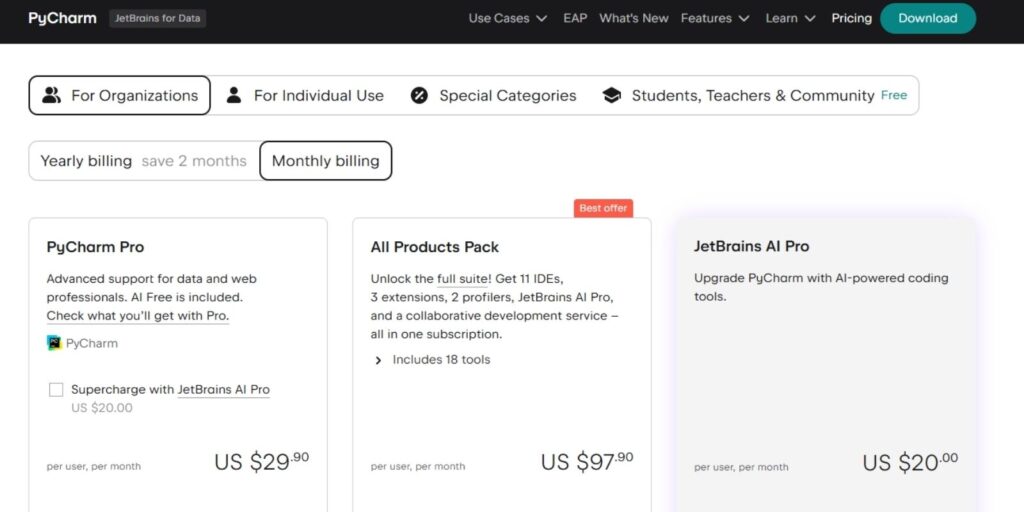
VSCode is free and open-source, which makes it attractive for individuals and teams seeking no licensing costs.
Final Thoughts
The PyCharm vs VSCode decision ultimately depends on workflow preferences.
PyCharm excels in deep Python specialization, structured debugging, advanced error handling, and built-in project management tools.
VSCode stands out for customization, flexible setup, extensive extensions, and strong cross-platform integration.
There is no universal winner in the PyCharm vs VSCode comparison. Testing both tools in real development scenarios remains the most reliable way to determine which environment aligns with your needs.

César Daniel Barreto
César Daniel Barreto is an esteemed cybersecurity writer and expert, known for his in-depth knowledge and ability to simplify complex cyber security topics. With extensive experience in network security and data protection, he regularly contributes insightful articles and analysis on the latest cybersecurity trends, educating both professionals and the public.
 English
  German
  Danish
  Italian
  Swedish
  Romanian
  Thai
Thai  Vietnamese
  Japanese
  Dutch
Dutch  Korean
  Arabic
  Hungarian