Ethernet Patch Panel: Teljes útmutató a strukturált kábelezéshez, teljesítményhez és beállításhoz
2026. február 25. • César Daniel Barreto
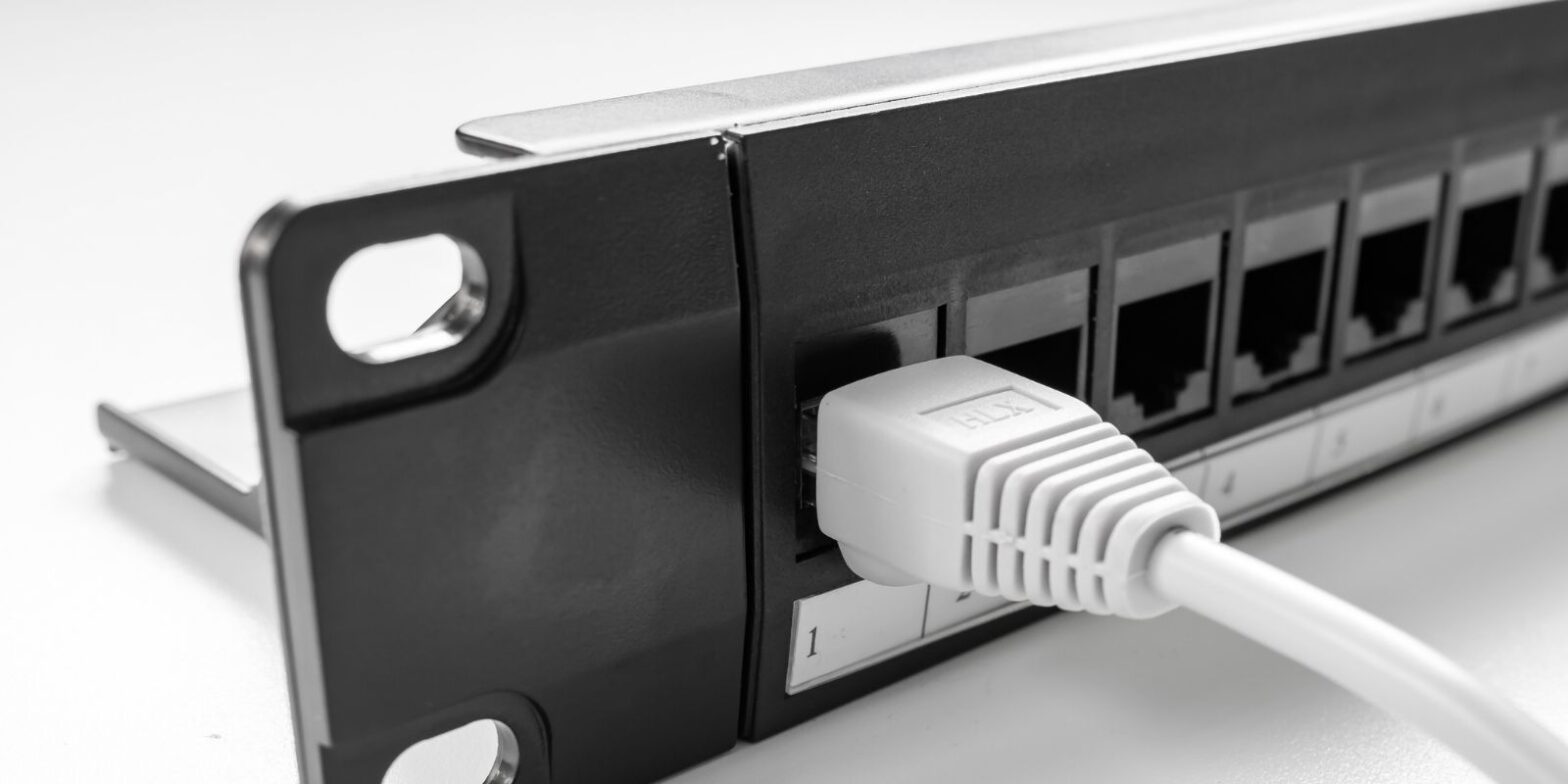
Az Ethernet patch panel egy passzív hardver eszköz, amely egy központosított helyen végződik és szervezi az épület állandó kábelezését. Az aktív eszközökkel ellentétben, amelyek adatokat dolgoznak fel, a patch panel egyszerűen strukturált végpontokat biztosít minden Ethernet kábel futtatásához, tiszta, skálázható alapot teremtve bármely hálózathoz.
Akár otthont kábelez, irodai szekrényt frissít, vagy kis szerverállványt épít, az Ethernet patch panel működésének megértése, és annak különbsége a switch-től, elengedhetetlen a hosszú távú hálózati teljesítmény és hatékonyság szempontjából.
Mi az Ethernet Patch Panel?
Az Ethernet patch panel általában egy fém keret, amelynek elején RJ45 portok sorai, hátulján pedig punch-down vagy keystone végződések találhatók. Minden szobákból vagy fali aljzatokból érkező falon belüli Ethernet kábel a patch panel hátuljához csatlakozik, központosított végpontot hozva létre.
Az elején rövid patch kábelek kötik össze a panel portjait aktív hálózati eszközökkel, mint például switchek vagy routerek. A portok között nincs belső kapcsolat. A patch panel nem dolgozza fel a forgalmat vagy vizsgálja a csomagokat, egyszerűen csak kiterjeszti az egyes kábeleket rendezett és kezelhető módon.
Ez a központosított elrendezés alapvető a strukturált kábelezési szabványokhoz, amelyeket üzleti környezetekben használnak.
Hogyan működik az Ethernet Patch Panel egy strukturált kábelezési rendszerben
Egy tipikus strukturált hálózatban:
Fali aljzat → falon belüli szilárd magú kábel → patch panel → rövid patch kábel → switch.
A hátoldalon minden kábel a T568A vagy T568B kábelezési sémák szerint van leütve. Az előlapon rugalmas patch kábelek csatlakoznak switchekhez vagy más eszközökhöz.
Mivel az Ethernet patch panel passzív, nem továbbít adatokat vagy befolyásolja az átvitel logikáját. Statikus kiterjesztési pontként működik, fenntartva a jel folytonosságát, miközben elválasztja az állandó kábelezést a gyakran változó kapcsolatoktól.
Például egy 16 asztalos irodában 16 falon belüli kábel futás végződik egy 24 portos patch panelen. Rövid patch kábelek kötik össze ezeket a portokat egy 24 portos switch-csel. Ha egy asztal másik VLAN-ra költözik, csak a patch kábel változik, nem a falon belüli telepítés.
Patch Panel vs Switch: A különbség megértése
Sok felhasználó összekeveri ezt a két eszközt, de szerepük alapvetően különbözik. A patch panel szervezi és végződik a kábeleket, míg a switch aktívan továbbítja az Ethernet kereteket az eszközök között.
Patch Panel vs Switch Összehasonlítás
| Funkció | Patch Panel | Kapcsoló |
|---|---|---|
| Eszköz típusa | Passzív hardver | Aktív hálózati eszköz |
| Szükséges áram | Nem | Igen |
| Fő funkció | Kábeleket szervez és végződik | Adatokat továbbít az eszközök között |
| Csomagfeldolgozás | Nincs | 2. vagy 3. rétegű feldolgozás |
| Belső kapcsolódás | Nincs kapcsolat a portok között | Portok összekapcsolva kapcsolási szövettel |
| Elsődleges cél | Kábelkezelés | Forgalomelosztás |
A switch eltávolítása az összes kábelt fizikailag összekötve hagyná, de adatátviteli képesség nélkül.
Mindkét eszköz együtt működik, az egyik struktúrát biztosít, a másik lehetővé teszi a kapcsolódást.
Miért használjunk Ethernet Patch Panelt?
- Kábelkezelés: Patch panel nélkül a hosszú falon belüli kábelek közvetlenül a switchekbe csatlakoznak, rendetlenséget és stresszt okozva a switch portokon. A panel javítja a kábelkezelést azáltal, hogy az állandó futásokat rögzíti és címkézi.
- Skálázhatóság és hatékonyság: Új futások hozzáadása vagy portok átrendelése egyszerűvé válik. Ez növeli az üzemeltetési hatékonyságot és csökkenti az állásidőt.
- Hálózati eszközök védelme: A gyakori csatlakoztatás/leválasztás ciklusok olcsó patch kábeleken történnek, nem pedig drága switch portokon, meghosszabbítva a hálózati eszközök élettartamát.
- Hibakeresés és teljesítmény stabilitás: A világosan címkézett portok gyorsabb diagnosztikát tesznek lehetővé, javítva a karbantartási hatékonyságot és az általános hálózati teljesítményt.
Ethernet Patch Panelek típusai
Réz Patch Panelek
A legtöbb telepítés réz Ethernet patch panel modelleket használ, amelyek támogatják a Cat5e, Cat6, Cat6a vagy Cat8 kábel szabványokat.
Gyakori port sűrűségi opciók közé tartozik a 12-portos, 24-portos és 48-portos. A nagyobb sűrűségű panelek ideálisak rack szerelésű környezetekben üzleti beállításokhoz.
Keystone Patch Panelek
A keystone patch panel moduláris keystone csatlakozókat használ, lehetővé téve az Ethernet, száloptika vagy más csatlakozók keverésének rugalmasságát. A keystone tervezések növelik a testreszabhatóságot és alkalmazkodóképességet.
Árnyékolt vs Árnyékolatlan Panelek
Az árnyékolt panelek nagy EMI környezetekben használatosak, és megfelelő földelést igényelnek. Az árnyékolatlan panelek gyakoriak lakossági és alacsony interferenciájú területeken. Az árnyékolt telepítések megfelelő földelési gyakorlatokat igényelnek a jel integritásának és teljesítményének fenntartása érdekében.
Rack szerelésű vs Falra szerelhető Patch Panelek
A legtöbb üzleti telepítés rack szerelésű paneleket használ 19 hüvelykes rackekben. Ez lehetővé teszi a szervezett integrációt switchekkel és más eszközökkel. Kisebb környezetekben a falra szerelhető verziók kompakt megoldásokat kínálnak teljes rackek nélkül. A rack szerelés és a falra szerelés közötti választás a rendelkezésre álló helytől, a port sűrűségi követelményektől és a jövőbeli bővítési tervektől függ.
Cat6e és Ethernet Patch Panelek: A zavartság tisztázása
Találkozhat a Cat6e kifejezéssel, de a Cat6e nem hivatalos TIA/EIA szabvány. Nagyrészt marketing kifejezés. Hivatalos szabványok közé tartozik: Cat5e, Cat6, Cat6a és Cat8. Patch panel kiválasztásakor illessze a kategória besorolást a telepített kábelhez, hogy fenntartsa a következetes átvitel képességét és teljesítményét.
A terminológia ellenőrzése és a finom névkülönbségek megértése elengedhetetlen a hálózatépítésben, hasonlóan ahhoz, mint a pontos szómegkülönböztetések ellenőrzése referenciaeszközök, például synonymer.it.com használatával, hogy elkerüljük a hasonló technikai címkék közötti zavart.
Cat6 vs Cat8 Ethernet Kábel
Kábelek párosításakor patch panellel, a kategória kompatibilitás számít.
A Cat6 1G-t támogat 100 méterig és 10G-t rövidebb távolságokig.
A Cat8 25G-t vagy 40G-t támogat, de általában 30 méterre korlátozódik, és elsősorban adatközpontokban használják. A legtöbb otthoni és irodai hálózati beállításhoz a Cat6 vagy Cat6a elegendő teljesítményt és jövőállóságot biztosít felesleges költségek nélkül.
Cat8 vs Cat6: Valóban szüksége van Cat8-ra?
A Cat8 magasabb árnyékolást és gyorsabb átvitel sebességeket kínál, beleértve a 10G és azon túli támogatást. Azonban teljesen árnyékolt komponenseket igényel. Rövidebb maximális távolsággal rendelkezik. Drágább. A tipikus strukturált Ethernet telepítésekhez a Cat6 vagy Cat6a gyakorlatiasabb és költséghatékonyabb.
Telepítési legjobb gyakorlatok
A megfelelő telepítés határozza meg a teljesítményt inkább, mint maga a switch modell.
Kulcsfontosságú szempontok:
- Tartsa minimálisra a csavarodást, amikor leüti a kábelt.
- Használja a megfelelő kábelezési szabványt (T568A vagy T568B) következetesen.
- Kerülje az árnyékolt és árnyékolatlan komponensek helytelen keverését.
- Biztosítsa a megfelelő földelést árnyékolt rendszerekben.
- Rögzítse a kábeleket a feszültség elkerülése érdekében.
A modern szerszám nélküli keystone panelek egyszerűsítik a telepítést, míg a hagyományos punch-down panelek megfelelő eszközöket igényelnek a megbízható végződéshez.
A helytelen végződés ronthatja az átvitel minőségét és csökkentheti a hálózati teljesítményt, még a csúcskategóriás hardverek esetén is.
Mikor van szüksége Patch Panelre, Switch-re vagy mindkettőre
Csak Switch: Kis otthoni beállítások eszközökkel a router közelében nem feltétlenül igényelnek patch panelt.
Patch Panel + Kapcsoló: Több szoba falon belüli kábel futása központosított patch panel és switch kombinációból profitál.
A patch panel szervezi a kábeleket. A switch lehetővé teszi az Ethernet kommunikációt. Együtt skálázható, professzionális hálózati alapot hoznak létre.
Végső gondolatok
Az Ethernet patch panel nem csak a szervezésről szól, hanem a strukturált hatékonyságról, a hosszú távú kábelkezelésről, a hálózati eszközök védelméről és a skálázható hálózati tervezésről.
Komoly otthoni telepítések és üzleti környezetek esetén egy megfelelően besorolt patch panel párosítása kompatibilis kábel szabványokkal és megbízható switch-csel biztosítja a stabil átvitel, erős teljesítmény és egyszerűsített bővítés.
A megfelelő típus, keystone, árnyékolt, árnyékolatlan, rack szerelésű vagy falra szerelhető kiválasztása a rendelkezésre álló helytől, interferencia környezettől és jövőbeli növekedési tervektől függ.
A strukturált kábelezésben a tisztaság és a tervezés mindig felülmúlja a rövidítéseket.

César Dániel Barreto
César Daniel Barreto elismert kiberbiztonsági író és szakértő, aki mélyreható ismereteiről és képességéről ismert, hogy egyszerűsítse a bonyolult kiberbiztonsági témákat. Kiterjedt tapasztalattal rendelkezik a hálózatbiztonság és az adatvédelem terén, rendszeresen hozzájárul betekintő cikkekkel és elemzésekkel a legújabb kiberbiztonsági trendekről, oktatva mind a szakembereket, mind a nagyközönséget.
 Hungarian
  English
  German
  Danish
  Italian
  Swedish
  Romanian
  Thai
Thai  Vietnamese
  Japanese
  Dutch
Dutch  Korean
  Arabic